Restaurant or café owner
Digital menu for restaurants
Upload your menu, print a QR code for every table, and start taking orders with 0% commission.
Free plan, $0. 0% commission.
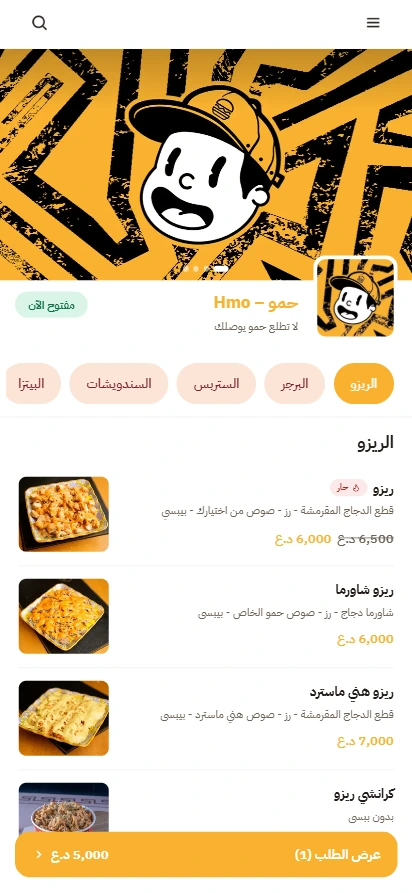
Get started
Make a QR code menu
Launch a free QR code menu for your restaurant today. New to QR menus? See how it works.
-
1
Find your business
Search for your restaurant and sign up on the free plan. Not listed? Add it manually.
-
2
Build the menu
Upload a photo or a PDF. AI builds it, and you review the items.
-
3
Download QR codes
Download a code for every table. You also get a link to share.
-
4
Print and place the codes
Guests scan it with their camera. No app needed. Works on iPhone and Android.
Why us
Your own ordering system, zero commission
Keep what you earn
0% commission. Stop paying a share of every order to delivery apps.
Easy to set up and manage
Upload your menu and share your link. Manage orders from one dashboard.
Your own ordering system
Your own website and link. Your customers and your orders.
Free plan
What the Free plan
Suits restaurants, cafés, bakeries, food trucks and cloud kitchens. See Pricing.
A menu with 15 items and 5 categories
With photos, sizes and add-ons. AI menu import included. Lite goes up to 100 items and 15 categories, and Pro has no limit.
Printable QR codes
QR codes for tables for dine-in orders. Pickup and delivery on the same menu.
Your own ordering website
Your menu on your own link, with SEO and a live order-status page.
Orders that ring
Orders ring in the app until you accept them. Unlimited staff accounts.
0% commission
We take nothing from your orders. No contract.
Unlimited orders
Receive any number of orders per month. The only limit is on menu items and categories, and upgrading lifts it.
Before you print
Why some “free” QR menus stop working
The QR code itself never expires. What can stop is the service behind some codes.
| Option | What's free | The catch |
|---|---|---|
| Our free plan | Menu, ordering website, QR codes, table ordering and 0% commission | 15 items and 5 categories on the menu. No trial period. |
| Dynamic QR generators | Static codes. A time-limited trial. | After the trial, dynamic codes stop. Static ones keep working. |
| General design tools | Static codes with no tracking. | Dynamic codes may carry the provider's logo. |
| “Free forever” plans | Unlimited scans | Whoever scans the code may see ads first, and an unused code may be deleted. |
Check each provider's terms before printing; plans change.
Static or dynamic
Static or dynamic QR code for a menu?
A static code carries the menu page link directly. It can't be edited, doesn't count scans and never expires. A dynamic code carries a short link that redirects to your page, so you can change the destination and count scans, and it works only while the service behind it is active.
Most owners ask: if I change the menu, do I reprint? No. The code opens your live menu, so a new item, a price or a sold-out flag shows on every printed code.
- Do menu changes show on the printed code without reprinting?
- Is it static or dynamic?
- What happens when the trial or plan ends?
- Is there a scan limit?
- Does it show an ad or the provider's logo?
Paper or digital?
Paper menu, or digital menu?
- Edit items and prices without reprinting
- Easy to read on a phone screen
- Photos, sizes and add-ons for every item
- Sold-out switches for items
- Guests can order straight from it
- Multilingual menu on Lite and Pro
A paper menu is familiar and quick to prepare, but any price or item change means reprinting, and guests can't order from it directly.
A digital menu opens when a guest scans a QR code, showing the latest items and prices on every printed code, with photos, sizes, add-ons and sold-out switches.
Upload a photo or file of your current menu, AI builds it, you review it, and then guests order from it directly.
Print it well
Print it so it scans: size, color and placement
Good places are the table stand, the cashier, the door and the bill holder. Use one code per table.
Black on white
Scanners read with red light. Print black on white and test other colors.
Leave the margin
Leave an empty margin four modules wide. Test before adding a logo.
Print it big
Minimum 2 × 2 cm (dynamic) or 3 × 3 cm (static). Test on iPhone and Android.
Mind the material
Clear plastic and glossy vinyl are hard to scan. Use a white card or a flat sticker.
Add words next to it
Also add the website address and keep a few printed copies of the menu.
Check for stickers
Beware of scam stickers placed over real codes. Check your tables.
Plans
When the free plan is enough, and when to upgrade
The free plan suits a new restaurant or café with a small menu (up to 15 items). Orders are unlimited on every plan, with 0% commission.
| What changes | Free ($0) | Lite (17$/mo) | Pro (39$/mo) |
|---|---|---|---|
| Orders per month | Unlimited | Unlimited | Unlimited |
| Menu items and categories | 15 items and 5 categories | 100 items and 15 categories | Unlimited |
| “Order via the platform” badge | Shown | Removed | Removed |
| Search engine optimization (SEO) | Yes | Yes | Yes |
| Coupons and scheduled orders | No | Yes | Yes |
| Commission on your orders | 0% | 0% | 0% |
Lite and Pro include a 7-day free trial; Free has no trial. Monthly, no contract.
Questions restaurant owners ask
Clear answers
Make a free QR code menu
Find your restaurant and start on the free plan. Build your menu, download QR codes and go.
Create my ordering website